Home › Making Tax Digital › Spreadsheets and bridging software
Can I use a spreadsheet for Making Tax Digital?
Yes. Sole traders and landlords can keep their Making Tax Digital records in a spreadsheet. A spreadsheet can’t send anything to HMRC by itself, though, so you also need bridging software. Here’s how that works, what your spreadsheet needs to hold, and the dates to send your updates by.
The short version
- You can keep your digital records in Excel or Google Sheets.
- To send quarterly updates and your tax return, you need HMRC-recognised bridging software that links to your spreadsheet. Use HMRC’s software finder on GOV.UK to choose one.
- Every entry needs a date, an amount and a category. The categories are the same ones as your Self Assessment return.
- Figures have to move from your spreadsheet to the software digitally, through a link or an import. You can’t retype them or copy and paste them.
- Each update sends your totals for the tax year so far. For 2026/27 they’re due by 7 August, 7 November, 7 February and 7 May.
What bridging software does
Making Tax Digital for Income Tax needs two things. The first is digital records of your income and expenses. The second is software that can send information to HMRC through its MTD system. All-in-one apps do both. Bridging software does only the second part: it reads the figures from your spreadsheet and sends them.
Most bridging products work in one of two ways. Some read set cells or a set range in your spreadsheet. Others import a file you save from it. Either way, the figures go from your records to HMRC without being typed in again. HMRC doesn’t supply software itself. GOV.UK’s software finder lists products that have passed HMRC’s checks. You can filter it for bridging software, and some products are free for simple cases.
The digital link rule: once your records are digital, any move of figures between your spreadsheet and your software has to be digital too. That means a link, a formula or an import. Copying and pasting, or reading a total off the screen and typing it in, isn’t allowed.
The records your spreadsheet needs
GOV.UK says each digital record needs at least:
- the amount, which is what you received or paid
- the date you received or paid it
- the category it falls into, such as turnover or car, van and travel expenses
You record each business separately. Each self-employment is its own business. All your UK rental properties together count as one UK property business, and so do overseas properties. For a property you own jointly, record your share. Keep your receipts and invoices as evidence too. A photo or scan is the easiest way.
The categories you send
Quarterly updates use the same categories as the Self Assessment return. For a sole trader, those are the boxes on the self-employment pages (SA103F). For a landlord, they’re the boxes on the UK property pages (SA105).
| Self-employment expenses (SA103F) | UK property expenses (SA105) |
|---|---|
| Cost of goods bought for resale or goods used | Rent, rates, insurance and ground rents |
| Payments to subcontractors (CIS) | Property repairs and maintenance |
| Wages, salaries and other staff costs | Non-residential finance costs |
| Car, van and travel expenses | Legal, management and other professional fees |
| Rent, rates, power and insurance costs | Costs of services provided, including wages |
| Repairs and maintenance of property and equipment | Other allowable property expenses |
| Phone, fax, stationery and other office costs | Residential finance costs (mortgage interest), which gives a tax reduction rather than an expense |
| Advertising, interest, bank charges, bad debts, accountancy and legal fees, depreciation and other expenses |
- Turnover under £90,000? You can send a business’s expenses as one total instead of by category. The threshold applies to each business separately.
- Simplified expenses go in the matching category. Mileage at 55p a mile (the 2026/27 rate for the first 10,000 business miles, then 25p) goes in car, van and travel expenses. The working-from-home flat rate goes in rent, rates, power and insurance costs.
- Mistakes don’t need a separate correction. Fix your records and the change goes into your next update, because each update covers the year so far.
Quarterly update deadlines 2026/27
Each update covers the tax year from 6 April up to the end of the latest quarter:
(to 5 July)
(to 5 October)
(to 5 January)
(to 5 April)
If your accounts run to 31 March, you can choose calendar periods instead, ending 30 June, 30 September, 31 December and 31 March. The deadlines stay the same. You choose before your first update, and you can’t change it afterwards for that year. HMRC won’t give penalty points for late quarterly updates in 2026/27, but the updates still have to be sent before your tax return, and the 2026/27 return is due by 31 January 2028.
Not sure whether you’re in yet? It depends on your self-employment and property turnover before expenses: over £50,000 in 2024/25 means from April 2026, over £30,000 in 2025/26 means from April 2027, and over £20,000 in 2026/27 means from April 2028. Try our free MTD start date checker.
Setting up a spreadsheet that works
- One row per entry, with date, business, category and amount in their own columns. Use dropdowns for the business and the category, so the names always match.
- A summary area with a fixed layout. Bridging software usually reads set cells, so give each business and category its own row that never moves, with year-to-date totals for quarters 1 to 4.
- Cumulative totals. Each quarter’s column should add up everything from 6 April to the quarter end, not just that quarter.
- Checks that catch mistakes: missing categories, a property category on a trade entry, and dates outside the tax year.
- A record of what you sent. Note the date of each update so you can see what’s due next.
Before you commit, try your bridging software with your spreadsheet. Products differ in what they can read, and some come with their own template.
Spreadsheet or all-in-one app?
A spreadsheet plus bridging software suits you if you already keep good records in Excel or Google Sheets, have one or two simple businesses, and don’t want a monthly app subscription. An all-in-one app suits you if you’d like bank feeds, invoicing and receipt scanning in one place, or if your accountant already uses one. Either way, start keeping digital records a few months before your start date.
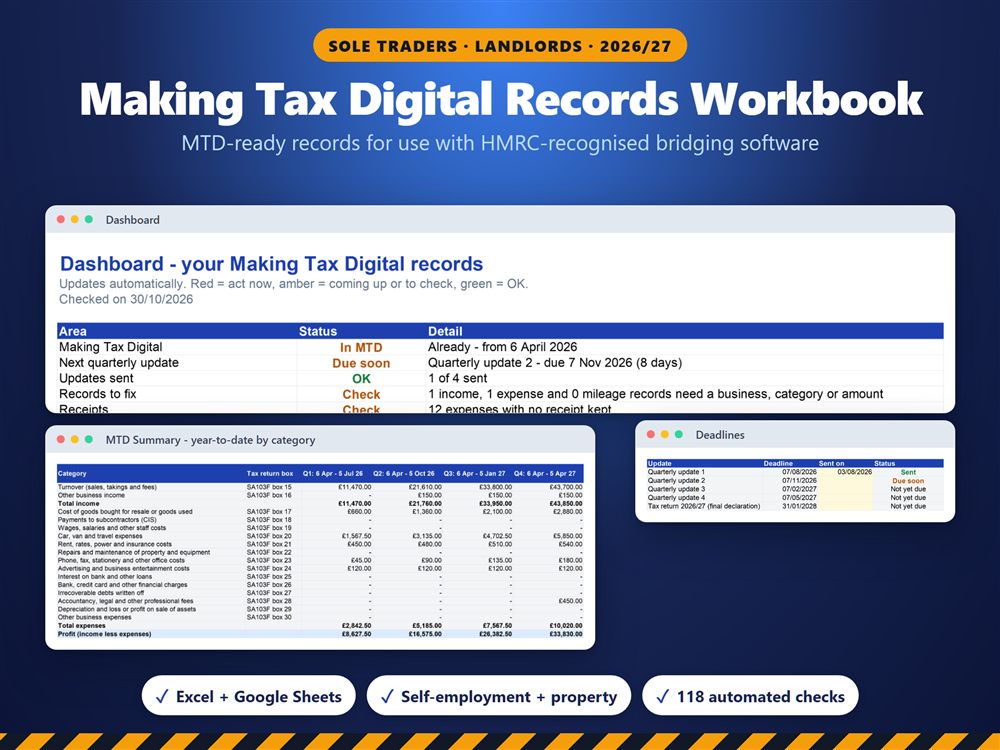
Our Making Tax Digital Records Workbook keeps MTD-ready records for use with HMRC-recognised bridging software. It handles up to three self-employments plus your UK property business and uses the Self Assessment categories, with mileage and working-from-home costs added in automatically. A fixed-layout summary gives year-to-date totals for each quarterly update, and a deadline tracker and threshold check are included. Excel and Google Sheets. It doesn’t send anything to HMRC, so you’ll still need bridging software for that.
See the template on EtsyRelated: Making Tax Digital guide · MTD start date checker · CIS and Making Tax Digital